8 reasons to choose Leviia Next as a sovereign alternative to Microsoft 365
(Mis à jour le )
According to the 2025 Intranet Observatory by consulting firm Arctus, 82% of respondents work primarily in Microsoft 365. Yet Microsoft’s collaboration suite carries a real legal risk: hosting data in Europe isn’t enough to shield it from US law.
Leviia Next, our sovereign collaboration suite, is an alternative to Microsoft 365. Built on the open source Nextcloud platform and hosted and managed in France, it helps large enterprises and public sector organizations gain greater control over their data.
Leviia Next gives organizations a single platform for storing, sharing and editing documents, collaborative office work, instant messaging, video conferencing, team organization, AI assistance and more. Open source technology, security, integration with existing systems, supported migration and data portability: here are eight reasons to choose this French alternative.
1. A sovereign cloud hosted and operated in France
Microsoft is a US company, so it is subject to US law even when its infrastructure is located in Europe. The CLOUD Act allows US authorities to demand access to data under a company’s control, even when that data is stored abroad. The Foreign Intelligence Surveillance Act (FISA), for its part, allows surveillance programs to be set up for intelligence purposes.
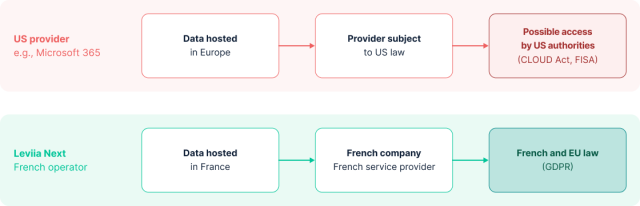
Hosting in Europe therefore doesn’t remove this legal exposure. At Leviia, our infrastructure and service providers are all based in France. We operate the service entirely in-house, and we’re independent of Big Tech. Our suite is built on open source technology, which limits our reliance on proprietary vendors and keeps us in control of how it evolves. Hosting your data in France is a contractual commitment. Data processing remains subject to GDPR requirements.
For businesses, this high level of sovereignty means tighter control over strategic information: customer files, financial data, research projects, trade secrets. For public sector organizations, it helps protect citizens’ data and keeps government services independent. Where and how your data is hosted, who manages it and which jurisdiction it falls under: everything is clear from day one.
2. Les principaux usages collaboratifs réunis dans une plateforme
Much of a team’s everyday work is collaborative by nature: drafting shared meeting notes, filling in a spreadsheet with data from several departments, building a presentation together, running a remote meeting. Leviia Next brings all of this together on a single platform.
| Microsoft 365 | Leviia Next | |
|---|---|---|
| File storage and sharing | OneDrive | Nextcloud Files |
| Collaborative office suite | Word, Excel, PowerPoint | OnlyOffice |
| Instant messaging and video conferencing | Teams | Nextcloud Talk |
| Project and task management | Planner | Nextcloud Deck |
| Shared calendars | Outlook Calendar | Nextcloud Calendar |
| Forms and surveys | Microsoft Forms | Nextcloud Forms |
| AI assistant | Microsoft Copilot | Nextcloud Assistant (selon configuration de Leviia Next) |
| Outlook, Exchange Online | Nextcloud Mail (selon configuration de Leviia Next) |
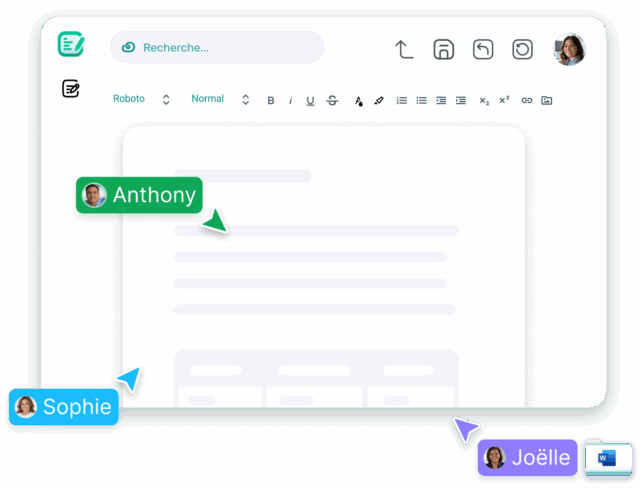 Nextcloud Files lets you store files and manage sharing with colleagues and external partners alike. The OnlyOffice suite handles collaborative editing of Word, PowerPoint and Excel documents. It’s compatible with all major office formats, including .docx, .xlsx and .pptx.
Chat and video conferencing are built into the suite through Nextcloud Talk: messaging, audio and video calls, and screen sharing, from a browser, mobile device or desktop app.
Email is integrated through Nextcloud Mail: connect your existing mailboxes and manage your messages directly in Leviia Next, alongside your files and calendars.
The Nextcloud AI assistant can help you work on text and generate summaries, depending on the models and features configured for your project.
3. Transparency through Nextcloud and open source
Leviia Next is built on proven open source technologies: Nextcloud first and foremost, along with MariaDB, Kubernetes and Docker. Our suite runs on open software, and our developers actively contribute to Nextcloud. This hands-on expertise lets us strengthen our solutions and tailor them to each organization’s needs.
Above all, open source brings transparency. Nextcloud’s code is publicly available and can be reviewed by your own teams or by independent experts, whether to understand it, audit it or look for potential vulnerabilities. That isn’t the case with proprietary software, whose development stays in the vendor’s hands.
4. Tailored deployment and long-term operations
To succeed in an organization of several hundred to several thousand users, a collaboration suite has to fit in with existing directories, business applications and well-established processes. The last thing teams and administrators need is a siloed environment with its own accounts and its own rules.
That’s why Leviia Next supports integration with existing directories and systems, including SSO, and lets you enable only the applications you need, to avoid clutter. A public agency wants to keep its working groups and sharing rules? A multi-site company wants to give everyone shared access to its document resources? We tailor the integration to each organization’s actual usage, technical constraints, regulatory framework and security policies.
That said, open source doesn’t mean no maintenance or monitoring: Leviia Next combines open software with professional operations. Our teams run the platform over the long term, monitoring performance, applying security patches and managing version upgrades. As your needs evolve, we can develop additional components and adapt the environment. The user interface and branding can also be customized.
5. An architecture built for large-scale deployments
Leviia Next was designed specifically for large enterprises and organizations.
Our suite works with all major operating systems (Windows, macOS, Linux, iOS and Android) and scales to very large organizations: we can bring users together behind a single access point and maintain stable performance for several hundred thousand users, with storage volumes of up to several hundred terabytes. Every setup is tailored: SSO, bandwidth, servers, backups and feature restrictions can all be customized.
 Île-de-France Region: 550,000 users on monlycée.net
 Île-de-France Region: 550,000 users on monlycée.net
For the Île-de-France Region (Greater Paris), we deployed a suite integrated with monlycée.net for some 550,000 students, teachers and administrative staff, with 10 to 100 GB of storage per user.
During deployment, our teams connected the suite to the regional SSO, Worldline PSN services and the existing SOC/SIEM security monitoring tools.
Feedback from the project shows high availability with no drop in performance.
Read more: the Île-de-France Region case study.
6. Data protected in a controlled environment
The devil is in the details, especially when it comes to information security. A folder shared too widely, a link left active after a project ends, permissions left in place after someone changes roles: there are plenty of ways to create unnecessary exposure.
For an IT department, the challenge is overseeing how hundreds of users work. Leviia Next lets administrators set read and write permissions for each project and segment data by user group. This lets you apply the principle of least privilege: everyone gets access to the resources they need for their work, and nothing more. On top of these safeguards come everyday protections such as external SSO, two-factor authentication and the option to enforce a strong password policy.
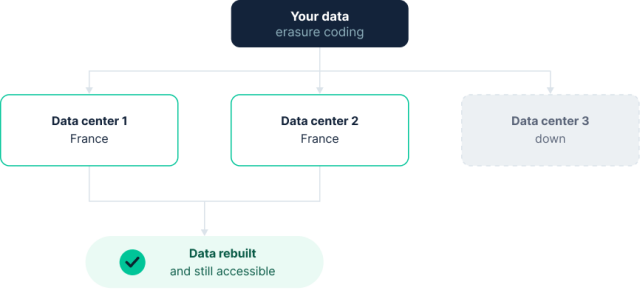
Leviia is ISO 27001 and HDS certified (HDS is the French certification for hosting health data). Data is encrypted in transit (HTTPS with TLS) and server-side. Environments are isolated, and data is backed up automatically every day, with the retention period of your choice. Our infrastructure distributes data across three French data centers using erasure coding, which lets your information be rebuilt if data is lost or a data center goes down.
7. A migration planned around your usage and your data
Switching collaboration suites affects large parts of an organization. It’s not just about moving files: you also need to identify key documents and keep access rights in order so teams can keep working. For a company or public body with several hundred users, this takes significant planning. That’s why Leviia Next includes migration support from storage services such as OneDrive, Google Drive and Dropbox. This support is included in the Leviia Next Pro plan.
Our teams work with you to define the migration scope: files, folder structures, accounts, permissions and any dependencies on your other tools. Other Microsoft 365 components (email, calendars, chat histories, SharePoint libraries) require a dedicated assessment by our teams to determine what can be transferred and under what conditions.
Depending on your organization’s constraints, the project can start with a pilot before a wider rollout. Your teams test documents, access and workflows in the new environment. The transition becomes gradual, with validation steps along the way and, of course, our support.
8. Data portability: staying truly in control of your data
The freedom to choose a provider means little if you can’t leave. Being able to get your data out is critical: what can you recover, in which formats, at what cost and with what support?
Nextcloud relies on open standards (WebDAV, CalDAV, OpenID Connect and more) that make Leviia Next highly interoperable. This openness gives you several ways to access your data and reduces dependence on a single interface. It provides a solid technical foundation if you ever need to move your data, a scenario that can come up quickly during a reorganization, merger or business transfer.
When these changes involve several hundred or even several thousand users, we address data portability from the very start of the project. It has to be planned: simply transferring files doesn’t automatically restore access rights, calendars, shares and integrations. We help you define the scope and formats involved, as well as timelines and costs.
FAQ - Frequently asked questions about Leviia Next
Considering a move to Leviia Next?
Want to know what the transition would look like for your organization? Contact us. We’ll review your project, its steps and requirements with you, so you get a clear picture of what deploying Leviia Next would involve.


